Section PPT
Revornix now supports generating PPT preview output from section content. This is not an external plugin path. It is a first-class part of the section detail workflow.
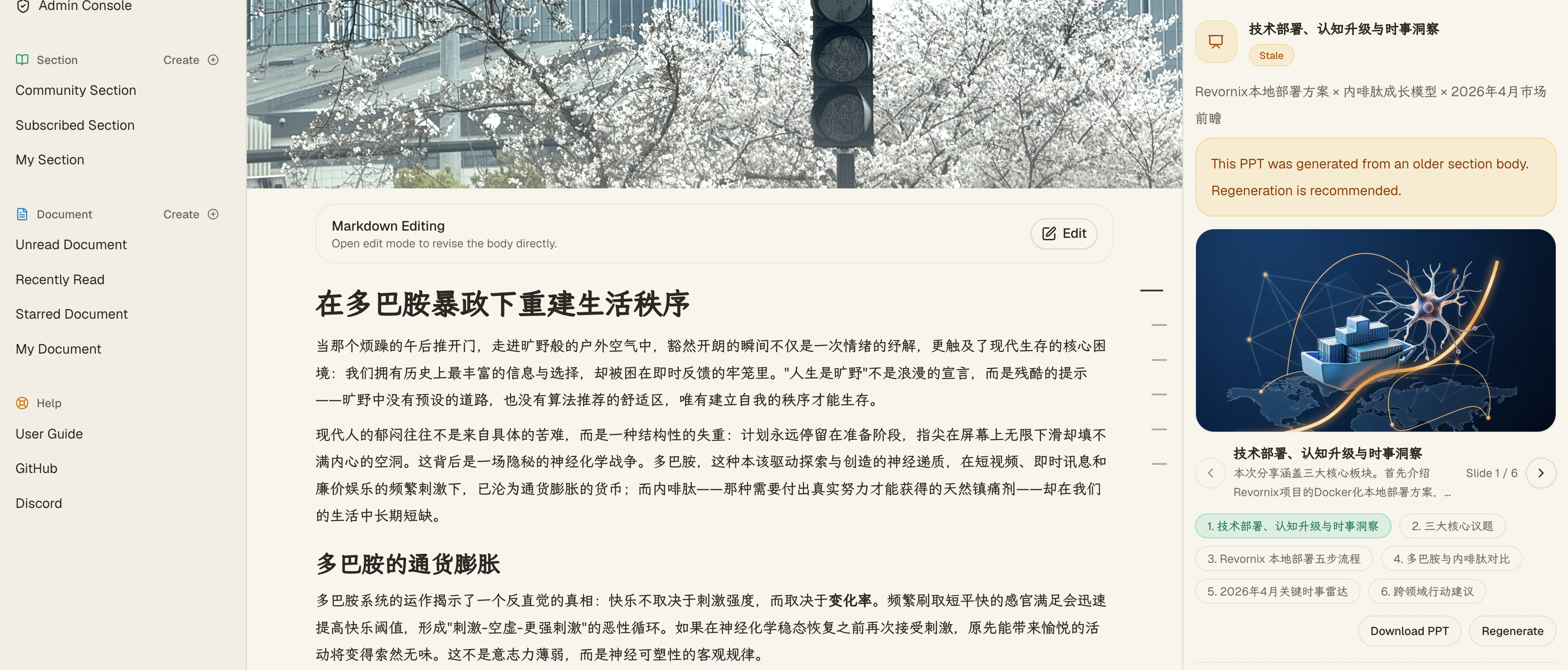
1. Where it appears
The PPT feature lives in the media area of the section detail page, alongside section podcast output.
When the section meets the required conditions, you can:
- Submit a PPT generation task
- View slide previews while generation is still running
- Browse the finished slides one by one
- Download the final
.pptxfile when the backend has produced it
2. Dependencies
PPT generation depends on:
- Existing usable Markdown content for the section
- An accessible default document-reading or summary model
- An accessible default image generation engine
The currently supported built-in image engine implementations include:
Banana ImageBailian ImageVolc Image
If you need the exact config fields for each one, read the engine guide.
If these resources are not ready, the UI gives you configuration guidance directly instead of only failing with a vague error.
3. Preview behavior
While processing:
- The page shows whether the task is queued or processing
- If some slides are already finished, those completed previews are shown first
After success:
- The page shows PPT title and subtitle style metadata
- You can move through slides with previous and next controls
- Slide preview images support click-to-zoom
- If a
.pptxfile exists, a download action is available
4. How this fits into the section workflow
PPT is not generated in isolation. It depends on the section’s already-produced content, so when the section’s document set changes, the PPT may need to be regenerated as well.
A more accurate workflow model is:
- Documents enter a section
- Section processing generates the main Markdown result
- Once that content is available, downstream artifacts such as podcast, PPT, and graph outputs can be regenerated
So PPT should be understood as one of the section’s derived content outputs, not as a separate upload-template feature.