Engines
Engines are no longer just “document parsing tools.” They now represent a broader set of specialized capability resources.
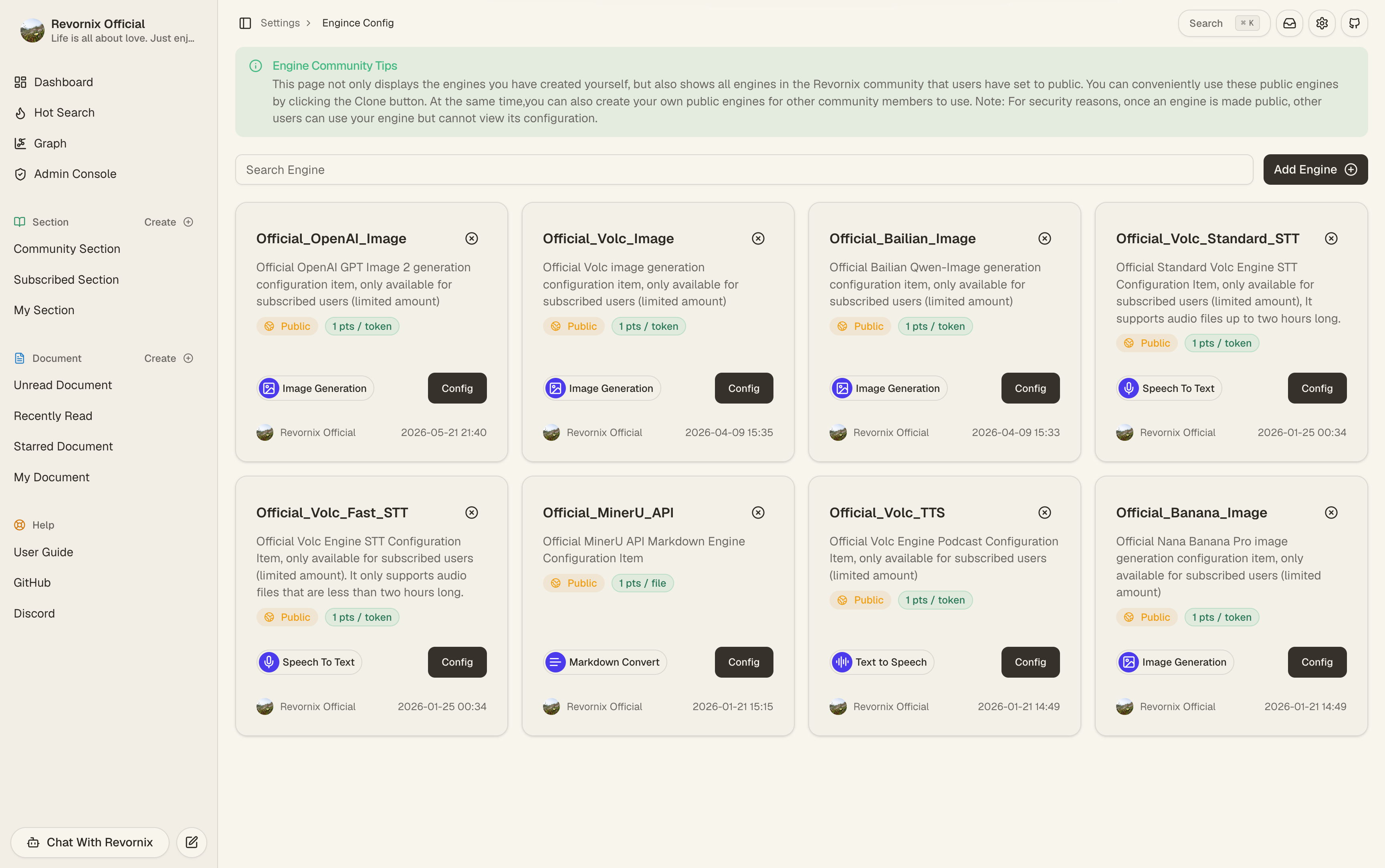
The main categories cover:
- Website and file to Markdown conversion
- Podcast generation
- Image generation
- Audio transcription
These engines usually work together with default models to form complete workflows.
1. Main engine categories
| Engine category | Representative engines | Use case |
|---|---|---|
| Markdown parsing | Markitdown, Jina, MinerU API | Convert websites and files into Markdown |
| Podcast generation | Volc Podcast Engine, OpenAI Audio Engine | Document and section podcast output |
| Image generation | Banana Image, Bailian Image, Volc Image | Section illustrations and PPT slides |
| Audio transcription | Volc STT Fast, Volc STT Standard | Audio-document transcription and meeting segmentation |
2. Default engine slots are now split by responsibility
The product no longer uses one generic “default engine” slot.
Settings split default engines into:
- Default website parse engine
- Default file parse engine
- Default podcast engine
- Default image generation engine
- Default audio transcription engine
Each of these defaults is validated for resource access before the setting is saved.
3. High-level meaning of engine config fields
Unlike models, engine config fields are not fully standardized. They depend on the engine type and provider implementation.
In practice, most engine fields fall into these buckets:
- Auth fields, such as
api_key,token, oraccess_token - Routing fields, such as
base_url,region,service,action, orversion - Capability-selection fields, such as
model_nameorreq_key - Generation-control fields, such as
size,negative_prompt, orseed - Audio-output fields, such as
audio_configorspeaker_info - Raw passthrough fields, such as
extra_body
In plain language:
- Auth fields decide whether you are allowed to call the upstream
- Routing fields decide where the request goes
- Capability fields decide which exact upstream feature is used
- Control fields shape the output behavior
4. Differences between parsing engines
Jina
- Still mainly used for website extraction and parsing
- Not a good primary choice for file parsing
- Requires a Jina API key
Field meanings:
api_key: The Jina Reader credential passed through theAuthorizationheader.
Markitdown
- Can handle both websites and files
- Better image-related parsing works when
openai_api_keyis configured - Also depends on the user’s default document-reading model in some flows
Field meanings:
openai_api_key: The OpenAI credential passed into MarkItDown’s internal LLM client. It helps MarkItDown handle richer understanding tasks during conversion.
MinerU API
- The official environment seeds an official hosted MinerU API engine
- In the official initializer, it is the only seeded official engine with
FREEplan access - It participates in website and file to Markdown workflows
Field meanings:
token: The MinerU API access token.uid: The MinerU-side user identifier used in request validation and checksum-related logic.
5. Role of podcast, transcription, and image engines
Podcast engines
Podcast engines now power both document and section podcast flows.
If the default podcast engine is missing, both document-podcast and section-podcast entry points will warn that the required resource is not configured.
Representative engines include:
Volc Podcast EngineOpenAI Audio Engine
In some modes, Volc Podcast Engine also depends on the default document-reading model to build dialogue-style podcast turns.
OpenAI Audio Engine config fields
base_url: The root URL of the OpenAI-compatible audio endpoint.api_key: The credential used to access that endpoint.model_name: The exact upstream model name used formodalities=["text","audio"]generation.
Volc Podcast Engine config fields
appid: The Volc podcast TTS application ID.access_token: The Volc podcast TTS access token.base_url: The WebSocket endpoint, defaulting to the official Volc podcast TTS URL.generation_mode: The generation mode. The current implementation mainly distinguishes betweenpromptanddialogue.speaker_info: Speaker configuration, especially thespeakersarray used to choose the two podcast voices.audio_config: Output audio settings, commonlyformat,sample_rate, andspeech_rate.use_head_music: Whether intro music should be added automatically.use_tail_music: Whether outro music should be added automatically.aigc_watermark: Whether to attach an AIGC watermark marker.dialogue_model_id: The model ID used to generate dialogue turns indialoguemode. If omitted, Revornix falls back to the user’s default document-reading model.scene: An upstream scene hint used in prompt mode, defaulting todeep_research.input_info: Extra input-control fields merged into the upstream request body.aigc_metadata: Extra AIGC metadata passed through to the upstream request.
The most important practical split is:
appid/access_token: “can I connect”generation_mode: “what generation path should be used”speaker_info: “who is speaking”audio_config: “what audio file should be produced”
Transcription engines
Audio documents depend on the default transcription engine to become usable text content.
The official seed includes:
Official_Volc_Fast_STTOfficial_Volc_Standard_STT
These two Volc STT engines expose the same main user-facing config fields:
token: The Volc speech-to-text access token.appid: The Volc application ID.
The difference is not in field names but in runtime behavior:
Volc Fast STT: optimized for fast turnaround and shorter audioVolc Standard STT: supports longer audio and returns results via submit-plus-poll flow
Meeting-record mode also depends on segment-level transcription capability:
segments: the engine can return per-segment start time, end time, and text.diarization: the engine can return speaker labels. If an engine supportssegmentsbut notdiarization, Revornix can still generate timestamped segments, but speaker separation degrades.
The meeting Markdown body, fullscreen-player Transcript panel, timestamp seeking, speaker renaming, and right-sidebar meeting insights all build on this segmented transcript artifact. Newly generated meeting Markdown keeps millisecond timestamps, such as 00:07.860.
If the default audio transcription engine does not support segments, the create page cannot enable meeting-record mode. Switch to a segment-capable transcription engine in Settings before creating the audio document.
Image understanding engines
There is also an auxiliary engine type for image understanding. The built-in implementation currently includes:
Kimi Image Understand
Its config fields are:
api_key: The credential for the image-understanding model endpointbase_url: The compatible API root URLmodel_name: The exact upstream vision model name
This engine is used to turn image content into text descriptions, not to generate new images.
Image generation engines
Image generation is no longer only about section illustrations.
It also affects:
- Automatic section illustrations
- PPT slide image generation for sections
The official seed includes:
Official_Banana_ImageOfficial_Bailian_ImageOfficial_Volc_Image
You can also add your own image engines, for example:
Banana ImageBailian ImageVolc Image
These built-in image implementations are not wired in the same way. A good mental model is:
| Engine | Integration style | Required config | Common optional config |
|---|---|---|---|
Banana Image | Uses an OpenAI-compatible chat.completions endpoint and expects the model to return a base64 markdown image | api_key, base_url, model_name | No hard-required extra fields in the current implementation |
Bailian Image | Uses Alibaba Cloud Bailian’s synchronous Qwen-Image generation API | api_key | base_url, model_name, size, negative_prompt, prompt_extend, watermark, seed |
Volc Image | Uses Volcengine OpenAPI image generation with signed requests | access_key_id, secret_access_key, req_key | base_url, region, service, action, version, model_version, negative_prompt, size, seed, scale, ddim_steps, width, height, use_pre_llm, return_url, extra_body |
Banana Image
Banana Image currently acts as an OpenAI-compatible image-generation adapter.
It does not call one fixed vendor API directly. Instead, it expects you to provide a compatible chat.completions endpoint whose model returns output in this form:
That means the current implementation expects:
api_keybase_urlmodel_name
Field meanings:
api_key: The credential used to authenticate against the upstream compatible service. In practice this is usually required unless the upstream allows anonymous access.base_url: The root URL of the OpenAI-compatible endpoint, such as your own gateway, a third-party proxy, or another compatible service. Revornix uses it to callchat.completions.model_name: The exact model name sent in the request. This decides which upstream image model is used and whether it can actually return a markdown image in the expected format.
It is a good fit when:
- You already have an OpenAI-compatible image gateway
- You want to wrap Gemini image generation or another compatible backend behind one shared engine slot
- You prefer to reuse existing OpenAI-style auth and routing infrastructure
Bailian Image
Bailian Image is based on Alibaba Cloud Bailian’s synchronous Qwen-Image text-to-image API. The current implementation expects these engine config fields:
api_key
Optional fields:
base_urlmodel_namesizenegative_promptprompt_extendwatermarkseed
If you do not override them, the implementation currently defaults to:
base_url = https://dashscope.aliyuncs.commodel_name = qwen-image-2.0size = 2048*2048
Field meanings:
api_key: The Bailian credential. Without it the request cannot be authenticated.base_url: The Bailian service entry point. The official URL is the default, so you usually only change this when routing through a proxy or gateway.model_name: The exact Bailian image model to use. The default isqwen-image-2.0, but you can override it when switching to a newer or different model.size: Output image size, usually in a format such as1024*1024or2048*2048. Larger sizes usually increase cost and latency.negative_prompt: Negative prompt text that tells the model what should not appear in the image.prompt_extend: Whether the provider is allowed to expand or enrich the prompt automatically. This can improve richness, but may reduce strict prompt control.watermark: Whether the generated image should include a watermark. This behavior is handled by the provider.seed: Random seed used to make results more reproducible.
Volc Image
Volc Image is wired to the Volcengine OpenAPI image generation service and currently uses the signed OpenAPI request flow. The required engine config fields are:
access_key_idsecret_access_keyreq_key
Common optional fields:
base_urlregionserviceactionversionmodel_versionsizenegative_promptseed
The current implementation also supports:
scaleddim_stepswidthheightuse_pre_llmreturn_urlextra_body
If you only want the smallest working setup, these three are usually enough:
access_key_idsecret_access_keyreq_key
The remaining fields mainly help you adapt the request to different Volc visual models, regions, and advanced generation parameters.
Field meanings:
access_key_id: The Volcengine OpenAPI access key ID used for request signing.secret_access_key: The secret paired withaccess_key_id, used to compute the signature.req_key: The image capability key to invoke. In practice this usually determines which visual generation path or product capability is used.base_url: The root URL of the Volc visual OpenAPI service. The official endpoint is the default, so you normally only change it when using a proxy or enterprise gateway.region: The signing region, defaulting tocn-north-1. It should match the actual region expected by the target service.service: The signed service name, defaulting tocv. You usually keep this unchanged unless the API contract itself changes.action: The OpenAPI action name, defaulting toCVProcess. You only change it when targeting a different API action.version: The OpenAPI version string, defaulting to2022-08-31.model_version: A more specific model-version selector inside the chosen Volc capability.size: A convenient output size setting when the target capability supports a unified size parameter.negative_prompt: Negative prompt text used to suppress unwanted elements, styles, or composition choices.seed: Random seed for reproducibility.scale: Prompt guidance strength. Higher values usually push the model to follow the prompt more strictly.ddim_steps: Sampling steps, which typically affect quality, detail, and latency.width: Explicit output image width.height: Explicit output image height.use_pre_llm: Whether to let the upstream perform prompt pre-processing or expansion before final generation.return_url: Whether the upstream should prefer returning an image URL instead of embedding raw image content directly.extra_body: A raw JSON object merged into the request body. This is useful when Volc adds new parameters before Revornix exposes them as first-class config fields.
6. Official hosted engines
The codebase now treats engines as billable or plan-gated resources as well:
- An engine can be marked
is_official_hosted - It can define a
billing_mode - It can define
billing_unit_price - It can define a
compute_point_multiplier
So an engine now communicates more than “this capability exists.” It can also express:
- Whether the engine is officially hosted
- How its usage converts into compute points
- Which plan level is required to access it
7. Official seeded engine set
In official deployment initialization, the public seeded engines are:
Official_Banana_ImageOfficial_Bailian_ImageOfficial_Volc_ImageOfficial_Volc_TTSOfficial_MinerU_APIOfficial_Volc_Fast_STTOfficial_Volc_Standard_STT
Among them:
Official_MinerU_APIis seeded withFREEplan access- The others are seeded with
PROplan access
8. Engine community and forks
- You can publish your own engines
- Public engines can declare required plan levels
- Other users can discover them in the community
- To really use one as your own resource, you still need to fork it first
So seeing an engine and being able to assign it as a default engine are now different things. Discovery, default selection, runtime access, and plan restrictions are connected.