Dashboard
The dashboard brings together the most frequently used personal workspace signals in Revornix, including the daily summary, hot-search streams, document status cards, label distributions, and reading-related shortcuts.
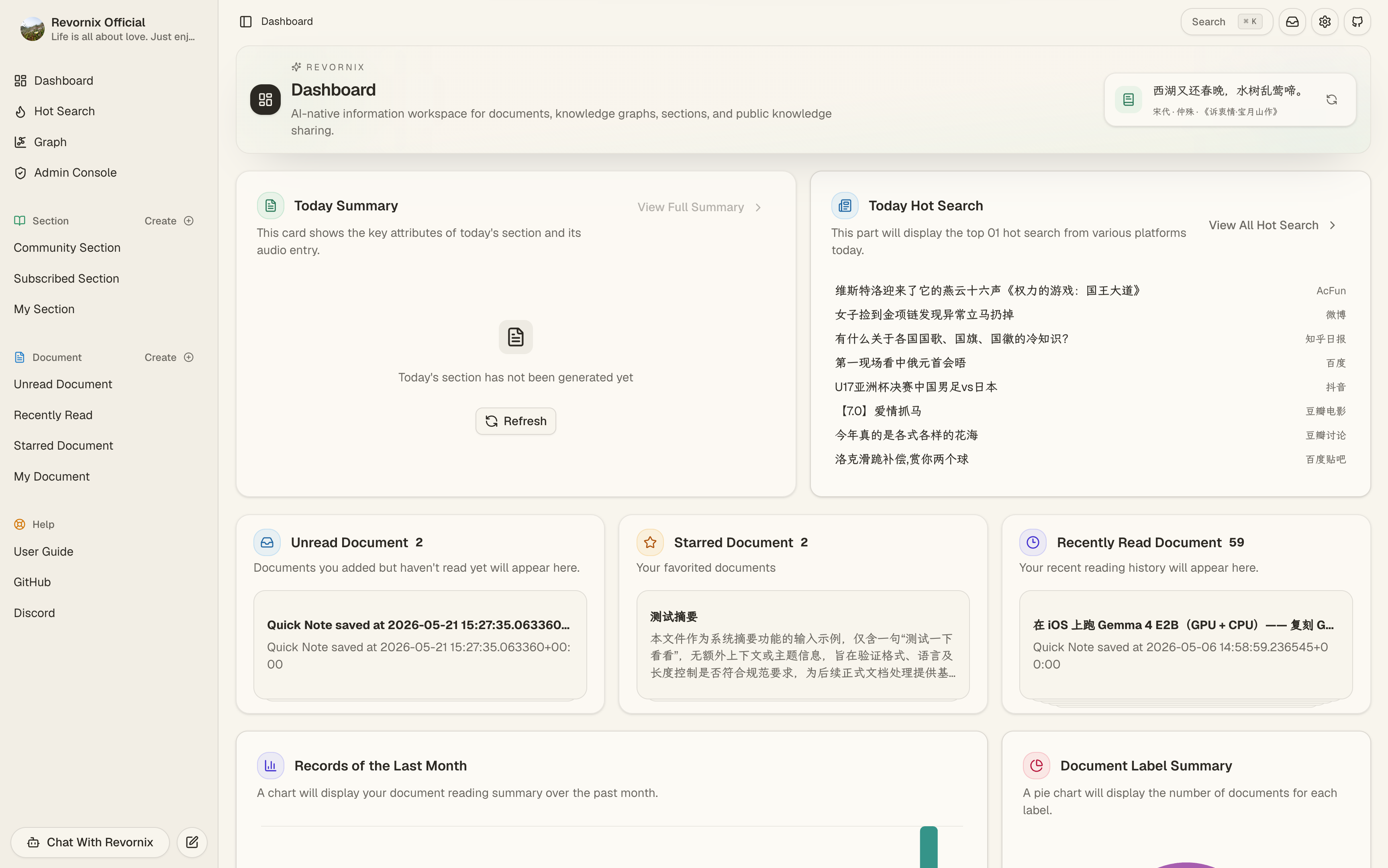
Page structure
The dashboard home is organized into several sections:
- Header area: shows the site title, description, and a refreshable random classical poem
- Initialization guidance: appears when default models, engines, or other required settings are not yet configured
- Daily summary area: shows the processing state and entry for the section generated from the day’s documents
- Hot-search area: aggregates multiple trending sources and links to the full hot-search page
- Document status area: shows unread, recent-read, and favorite document shortcuts
- Analytics area: shows daily document collection trends and a document label distribution chart
- Label area: shows document labels and section labels as quick filters
Initialization guidance
The dashboard can display an initialization prompt near the top of the page to guide new accounts through the required setup for default models, default document summary models, and default engines.
When these settings are incomplete, features that depend on default hosted resources continue to surface the related reminders on the page, including status prompts in the daily summary card.
Daily summary
The daily summary card shows the section generated from the current day’s document summaries. It surfaces:
- The section title, description, and cover
- The section processing state, such as pending, processing, completed, or failed
- The podcast generation state
- A direct entry to the section detail page
If no summary section exists for the day, the card displays an empty state. If the daily summary depends on a default podcast engine or a default image generation engine that has not been configured, the page shows the corresponding setup reminders.
Hot-search
The hot-search card reads from the dedicated hot-search service and shows the current top item from each configured source. It also links to the full hot-search page for broader browsing.
On the dashboard, hot-search acts as an aggregated entry point rather than the full browsing surface.
Document status cards
The dashboard includes three document status cards:
- Unread documents: shows the unread total and a stacked preview of recent unread items, then links to the unread document list
- Recent reads: shows the recent-read total and a preview of recently opened documents, then links to the recent-read list
- Favorite documents: shows the favorite total and a preview of starred documents, then links to the favorite list
The stacked document preview inside these cards can open the corresponding document detail page directly.
Document analytics
The dashboard provides two document analytics views:
- Daily collection trend: shows how many documents were added on each recent day
- Document label distribution: groups documents by label and visualizes the distribution as a chart
Together, these cards help identify recent collection activity and the main themes represented in the knowledge base.
Label shortcuts
The lower section of the page displays both document labels and section labels:
- Clicking a document label opens the “My Documents” view with that label applied as a filter
- Clicking a section label opens the “My Sections” view with that label applied as a filter
These shortcuts are useful as direct entry points into frequently revisited topics.
Random classical poem
The header area includes a random classical poem with a refresh action. It serves as a lightweight reading element and does not participate in document, section, or analytics calculations.
Data sources
The dashboard currently draws its data from:
- The daily document summary section
- The dedicated hot-news service
- Personal unread, recent-read, and favorite document lists
- Daily document trend statistics and label-based summaries
- Document label and section label collections